 WorkBook
The FTA Audit File is the file the tax authority can ask for to check your VAT return. WorkBook builds it from your posted records and tells you what is missing first.
Before you start.
- Your company's 15-digit TRN must be saved under Settings, then Profile.
- Your books must be in AED. A company in another base currency cannot export the file.
- You need permission to view reports.
Steps.
Open Reports, then FTA Audit File (FAF).
Set From and To to the period the tax authority asked for.
Read Export check. If it says Needs fixing, each line says what is missing and lists the documents it affects.
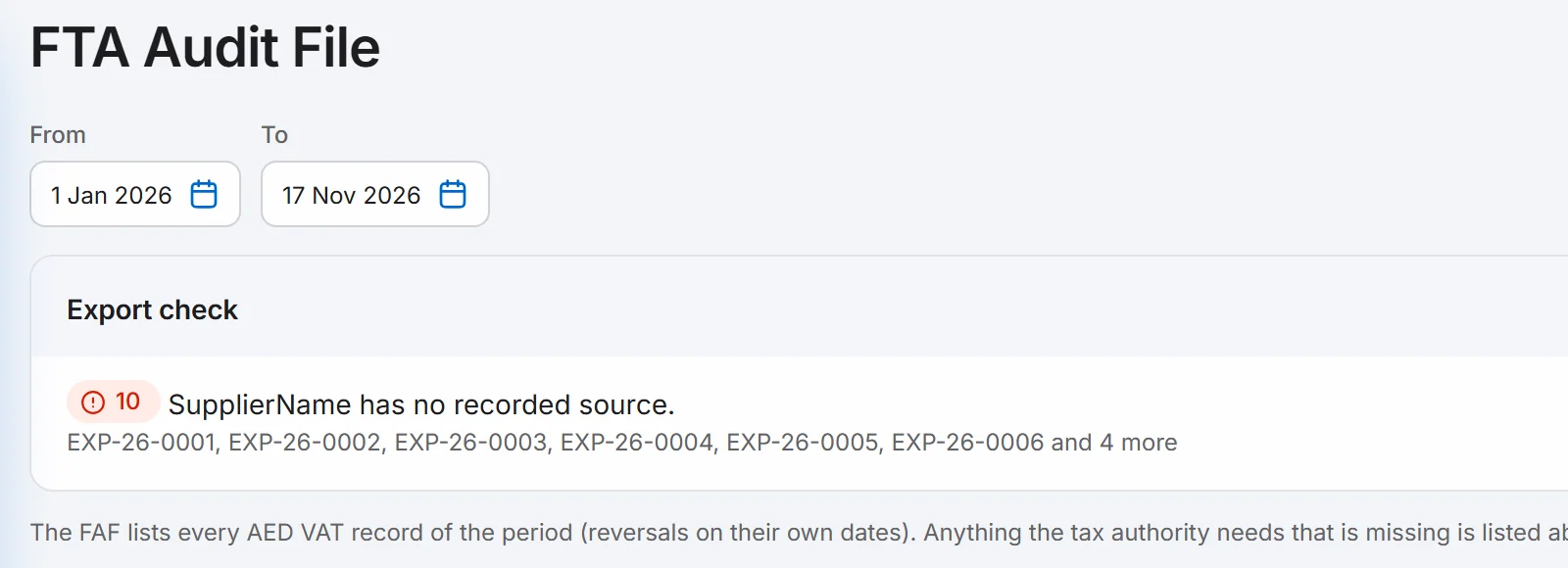
Open each listed document and add what is missing. Then change a date or reopen the page to check again.
When the check is clear, choose Download, then CSV or Text File (.txt).
Good to know.
- Download stays greyed out until nothing is left to fix.
- Common blockers: no supplier or customer name, a TRN that is not 15 digits, a foreign-currency document, and an import or reverse charge purchase. The file covers domestic AED records only.
- The VAT 201 boxes must match the file. If they do not, WorkBook says which box cannot be traced to the file.
- The file is named after the dates you chose, for example FAF-2026-01-01-2026-11-17.csv.
Related.
- File your VAT 201Open Reports, then VAT Return (VAT 201), pick the period and read the boxes. You then enter the figures on EmaraTax; WorkBook does not file for you.
- Bring in your opening balancesDownload the Excel workbook in Settings, fill in your balances, customers, suppliers, items and stock, add the file to check it, then import it once.